


Maya Gold Grid ATR is a professional trading robot designed exclusively for XAUUSD (Gold) on the cTrader platform.
The algorithm is built on an adaptive grid system, where order spacing is dynamically calculated using the ATR (Average True Range) indicator. This ensures the strategy adjusts to current market volatility and remains effective in different conditions.
⚙️Parameters Overview
The bot includes a wide range of parameter groups: presets, sessions, grid, volume, basket, and risk management. This structure makes it suitable both for traders who prefer plug-and-play solutions and for advanced users who want full control.
You can choose from ready-made presets (Low Risk, Balanced,High Risk) for quick setup depending on your preferred style.
For advanced traders, there is also a Custom mode that allows precise manual configuration of every parameter, so the strategy can be fine-tuned for your account size, leverage, and broker conditions.
🛡️ Key built-in risk controls include:
- Maximum holding time for losing positions
- Daily stop-loss limits and floating drawdown protection
- Free margin and volume safeguards
- Basket management (Take Profit or Cut) to close entire grids at once
Maya Gold Grid ATR is the ideal solution for traders who want the balance between adaptive automation and full manual flexibility in gold trading.
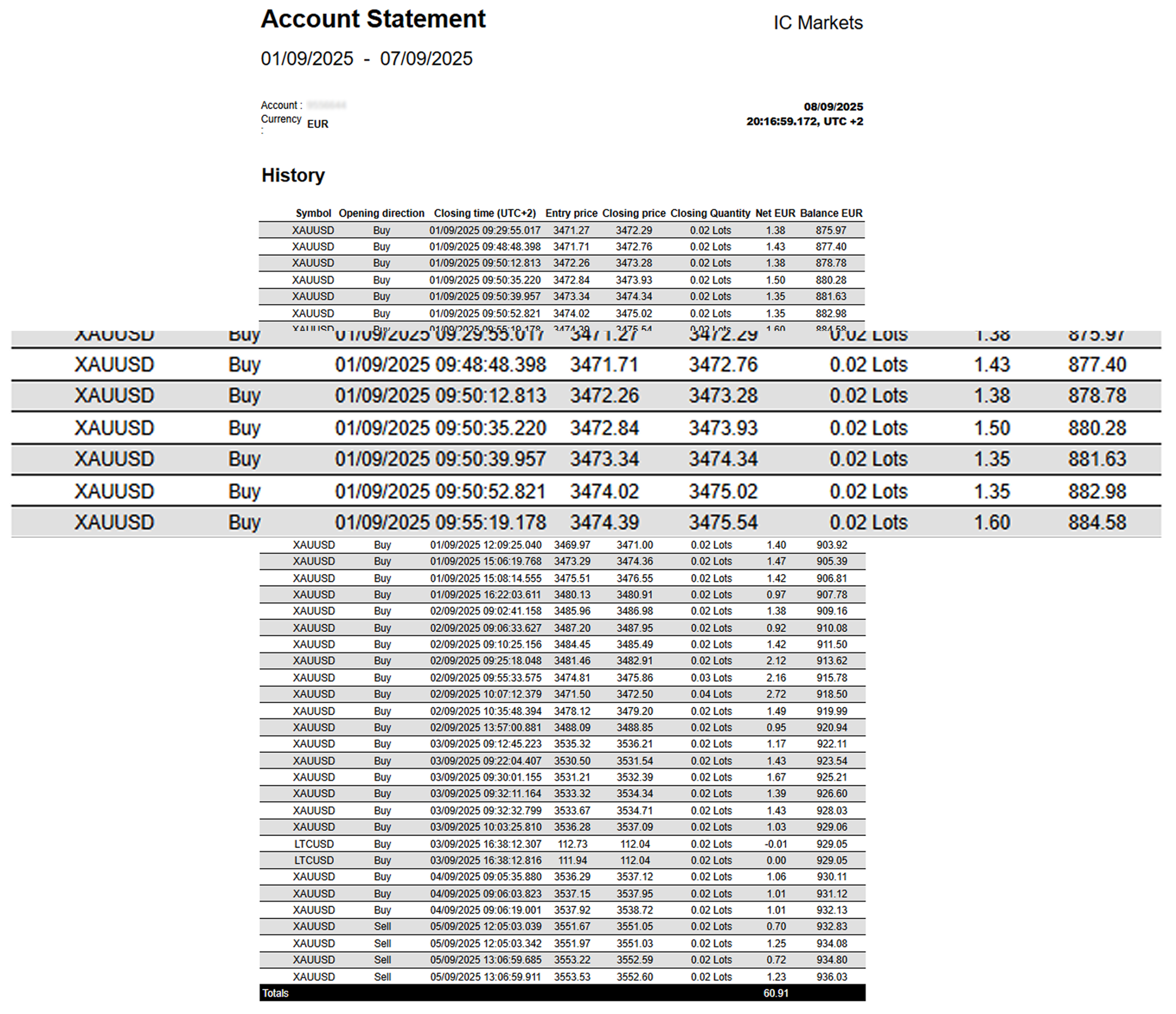
Trading involves risk. Backtests/optimizations show potential, not a guarantee. Real results depend on broker conditions (spread, commission, execution, leverage) and your settings. Always forward-test and optimize on tick data with your broker before going live.
Maya Gold Grid ATR offers a wide range of parameters grouped into logical sections for easier setup.
All settings can be applied automatically through optimized presets (Low Risk High Risk), or configured manually if you select the Custom preset, which unlocks full control over every parameter.
Maya Gold Grid ATR – Parameters Overview
Presets
The cBot includes four optimized presets: Low Risk and High Risk.
Each preset is based on extensive backtesting and provides a ready-to-use configuration for different account conditions and risk profiles.
For advanced users, the Custom mode allows full manual configuration of all parameters.
- Lower-risk presets: safer equity curve, slower growth.
- Higher-risk presets: faster growth, deeper drawdowns.
All parameters below are applied only for Preset = ‘Custom’
Session
Defines when the bot is allowed to trade and how it exits outside the window.
- Use Trading Window – Enables a fixed daily trading window. When ON, the bot opens new trades only between Start and End hours.
- Start Trading Hour (UTC) – Start of the trading window. Earlier start = more signals and activity; later start = fewer trades and cleaner sessions.
- End Trading Hour (UTC) – End of the trading window. Earlier end = lower exposure and fewer late-session entries; later end = more opportunities but longer market exposure.
- Session Exit Mode – What the bot does when the trading window ends (and/or when the session rules trigger):
- Hold – keeps positions running; only blocks new entries.
- Close Positions – closes open positions when session ends.
- Close + Cancel Grid – closes positions and removes pending/grid orders for a clean daily reset.
(Exact behavior depends on your bot’s enum mapping, but the idea is “how aggressive the session exit is”.)
- Close End of Day (EOD) – Forces a daily flat state. When ON, the bot closes trades every day at Close EOD Hour regardless of session logic.
- Close EOD Hour (UTC) – Time to close everything for the day. Earlier = safer (less overnight/weekend risk); later = more time to reach basket targets, but higher exposure.
Grid Core
Defines how the trading grid adapts to volatility.
- ATR Period – shorter period increases sensitivity (more frequent adjustments), longer period smooths volatility response.
- ATR Multiplier → Step – lower values tighten grid spacing (more trades, higher risk), higher values widen spacing (fewer trades, safer).
- TP per Level (pips) – smaller target provides quicker but smaller exits, larger target requires more patience but yields higher profit per trade.
- SL per Level (pips) – smaller stop losses reduce drawdowns but increase premature exits, larger stops allow more tolerance but increase risk.
- Levels per Side – fewer levels reduce exposure, more levels increase scaling and potential risk.
- Rebuild Missing Orders – when enabled, the bot automatically restores missing grid levels.
- Grid Side – controls on which side of the anchor price the grid places orders:
Both – classic grid (buy limits below anchor, sell limits above),
BuyOnly – only buy limits below anchor,
SellOnly – only sell limits above anchor.
Volume
Controls position sizing and scaling.
- Base Volume (lots) – initial lot size; smaller value reduces risk, larger value increases exposure.
- Max Total Volume (lots) – caps maximum exposure; lower values keep risk limited, higher values allow larger grids.
- Volume Multiplier per Level – geometric growth of lots; smaller values scale slower, larger values increase risk and reward faster.
Seeding
Defines how the first market trade is placed.
- Auto Seed When Flat – If the bot has no open positions or pending orders, place one market seed trade in the SeedDirection before rebuilding the grid (respecting MaxTradesPerDay).
- Seed Only Inside Session – When UseSession is enabled, allow auto-seed only during the defined session hours (StartHour–EndHour). When UseSession is off, this setting has no effect.
- Seed Direction (Buy/Sell/Auto) – controls the direction of the initial seed trade when the bot starts a new grid from a flat state (no open positions). It affects only the seed entry, while the grid itself is controlled by Grid Side.
BuyOnly – always open the seed as a buy.
SellOnly – always open the seed as a sell (default).
Auto – let the bot choose buy or sell automatically based on its internal logic and current market context.
Basket
Groups trades into a managed basket with profit/loss targets.
- Basket TP (money) – closes basket at defined profit in account currency; smaller values exit faster, larger values hold longer.
- Basket TP (pips vs avg) – closes basket once the distance to VWAP exceeds defined pips.
- Basket Cut (money) – forces basket closure at defined loss; lower values protect faster, higher values allow more tolerance.
Risk Managment
Built-in safety controls to protect capital.
Max Trades Per Day — Limits how many trades the bot can initiate per day. Lower values reduce activity and exposure.
Daily Loss Limit (%) — Stops trading for the day if the account’s closed PnL (Balance) falls by more than X% from the day’s starting balance. When triggered, the bot closes all positions and cancels pending orders until the next day.
Max Drawdown (Start Equity) (%) — Hard stop based on account equity decline from the equity level recorded when the bot starts. If equity drops more than X%, the bot closes all positions, cancels pending orders, and stops until restarted.
Risk Managment Pro
Advanced safety controls (recommended for experienced users).
Floating Drawdown Limit (%) — Closes all positions and cancels pending orders if floating drawdown exceeds X%. (Floating drawdown is measured from Balance to Equity, i.e., open losses.)
Min Free Margin After Order (%) — Requires a free margin buffer before placing new orders. Higher values are safer but may reduce trading frequency / grid expansion.
Time Stop (Losing Positions) — Enables automatic closing of losing positions after a maximum holding time.
Max Holding Time (min) — Maximum time a losing position can remain open (in minutes). Smaller values cut trades faster; larger values allow more room for recovery.
Execution (Spread Filter)
- Max Spread (pips, 0=off) — Maximum allowed spread for opening new exposure. If the current spread exceeds this value, the bot will pause seeding and stop placing new pending grid orders. Set to 0 to disable the filter.
- On Max Spread — Defines what the bot should do when spread is above Max Spread:
- BlockNewOrders — do not place new pending orders and do not seed (existing pending orders remain on the broker).
- BlockAndCancelPendings — cancel all existing pending grid orders and block any new orders/seeding until spread normalizes (recommended during news spikes / low liquidity).
Note: The spread filter uses a small recovery buffer before re-enabling trading to avoid constant on/off switching around the threshold.
General
- Label – trade label used for tracking and basket grouping.
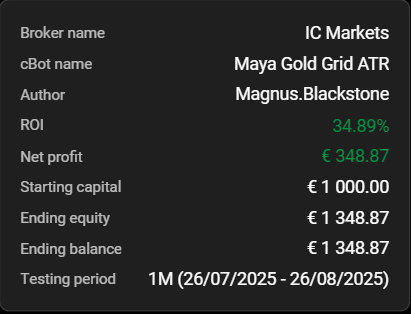
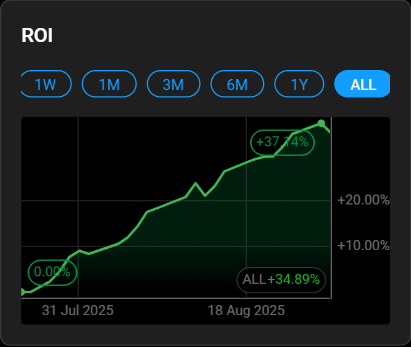
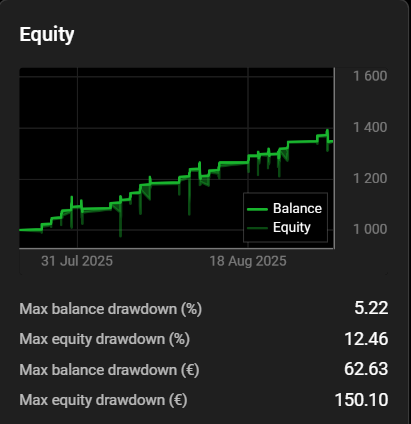
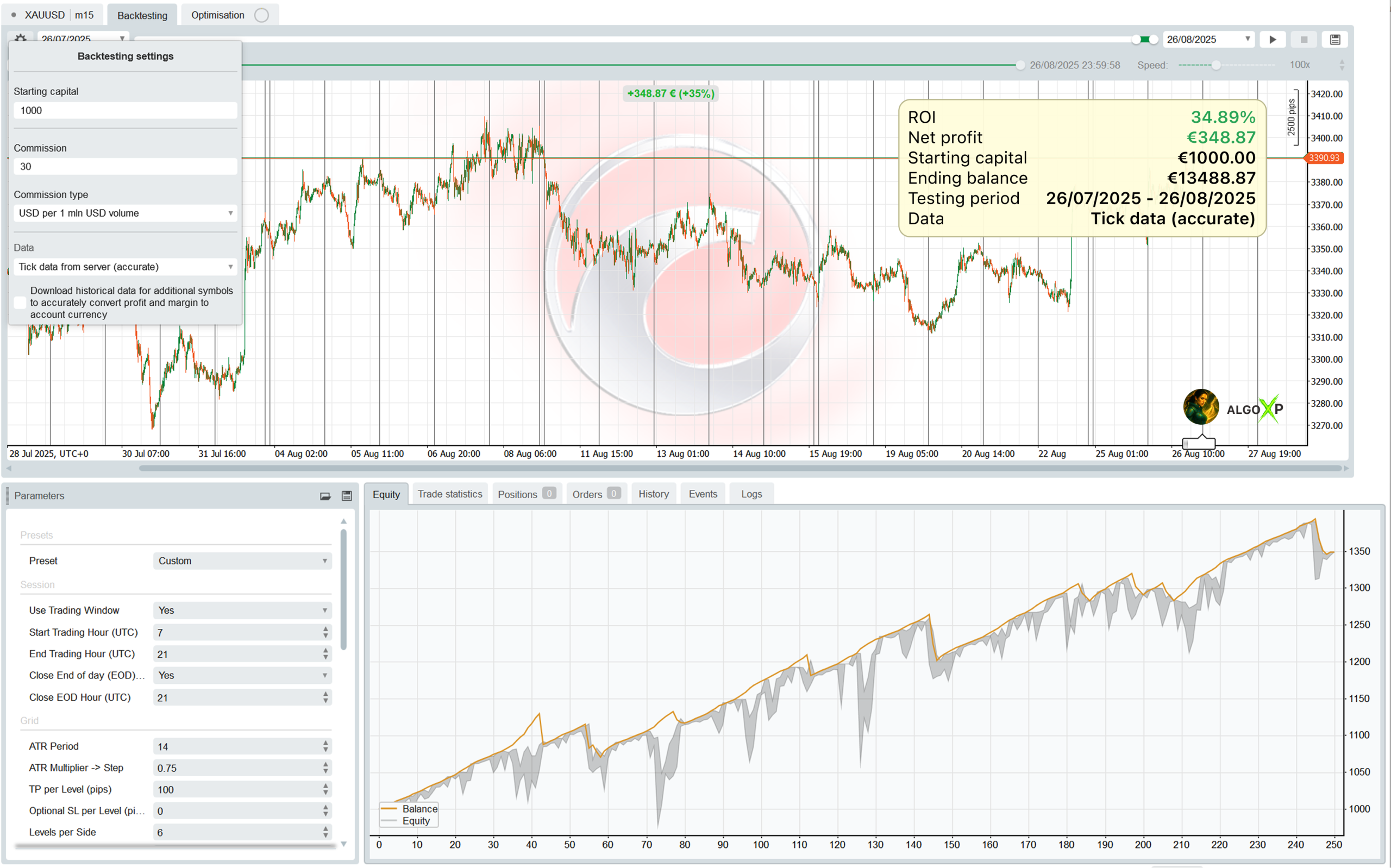
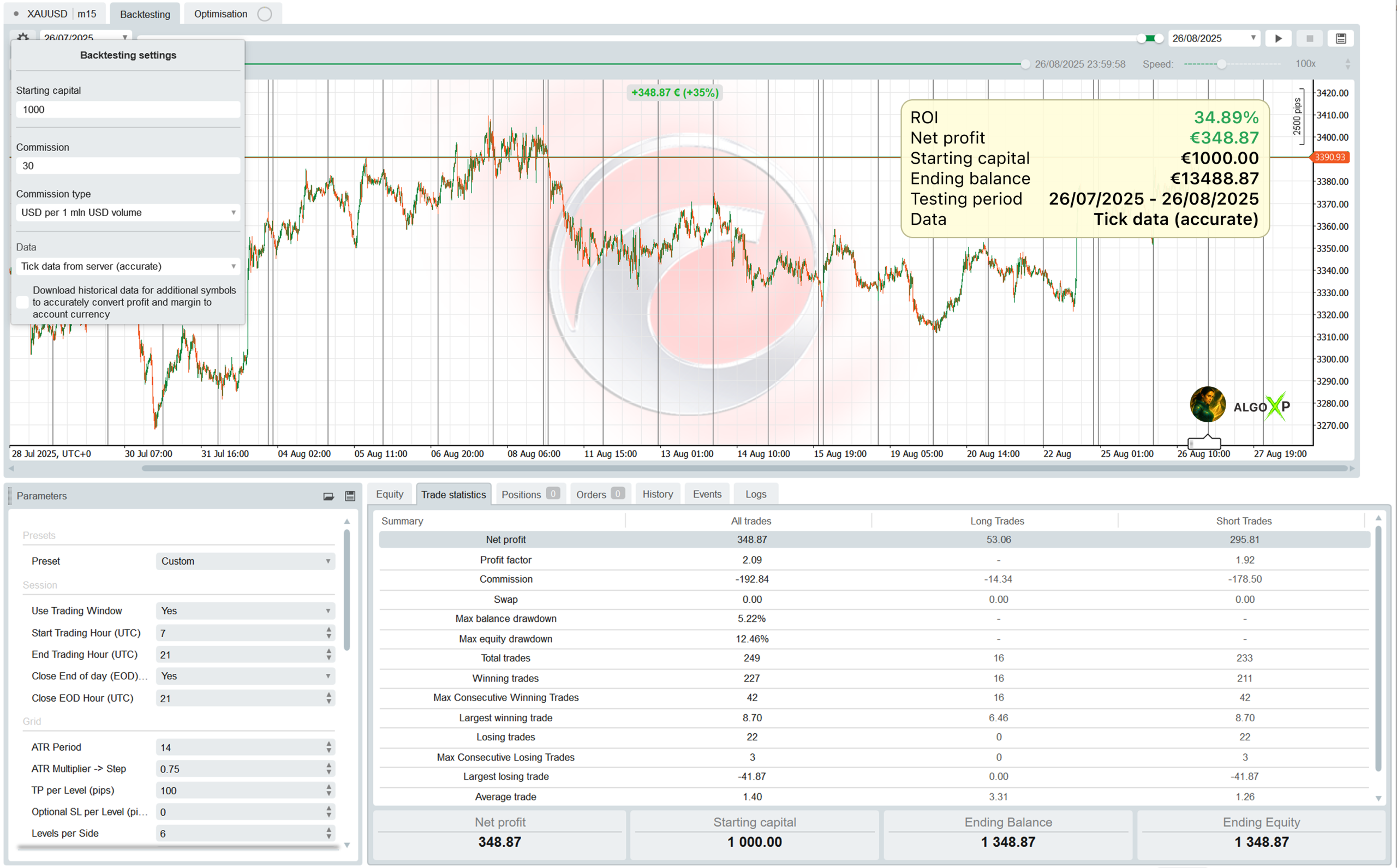
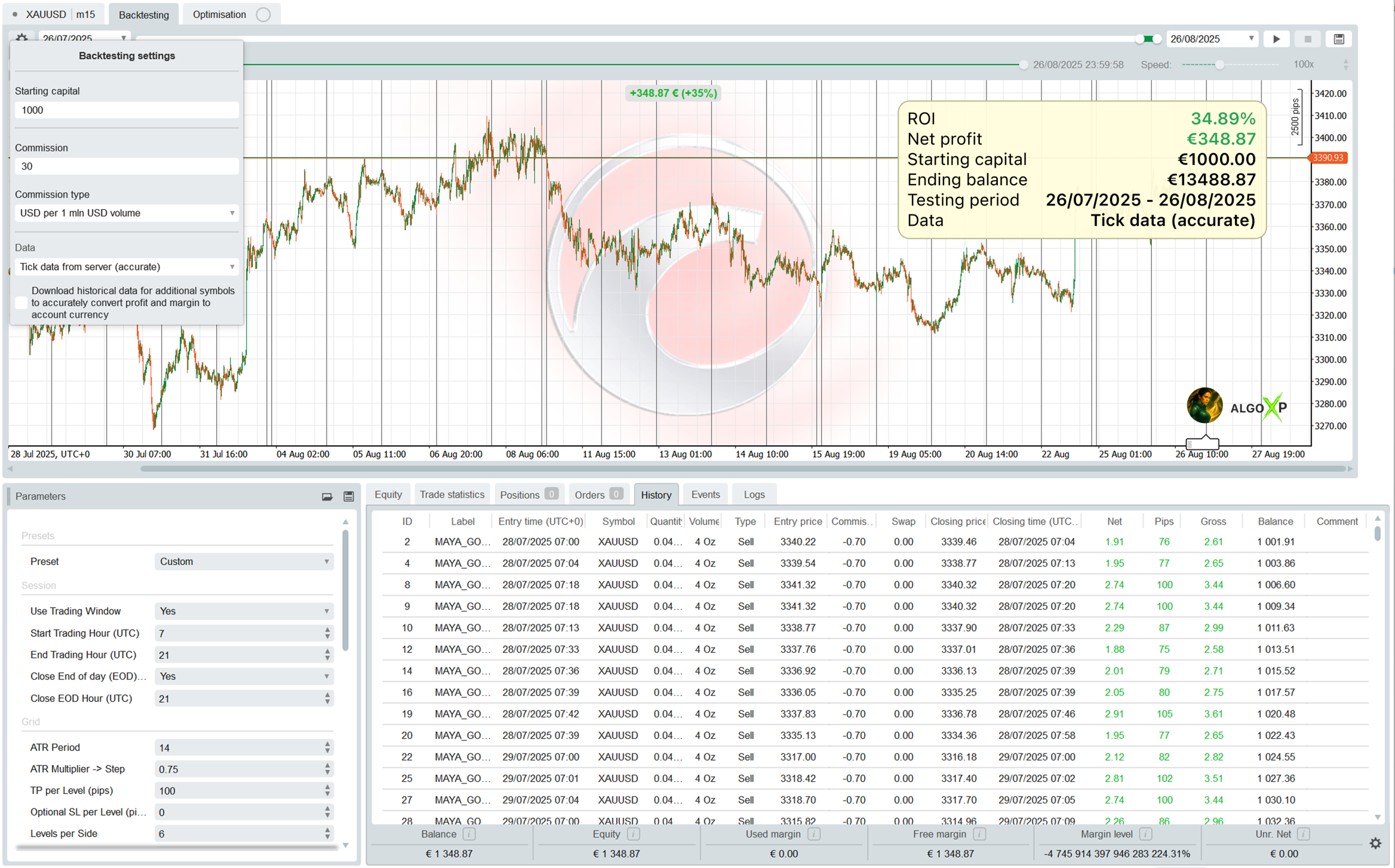
Backtesting on Ticks for 1 months 26/07/2025 -26/08/2025
Equity
Trade statistics
History
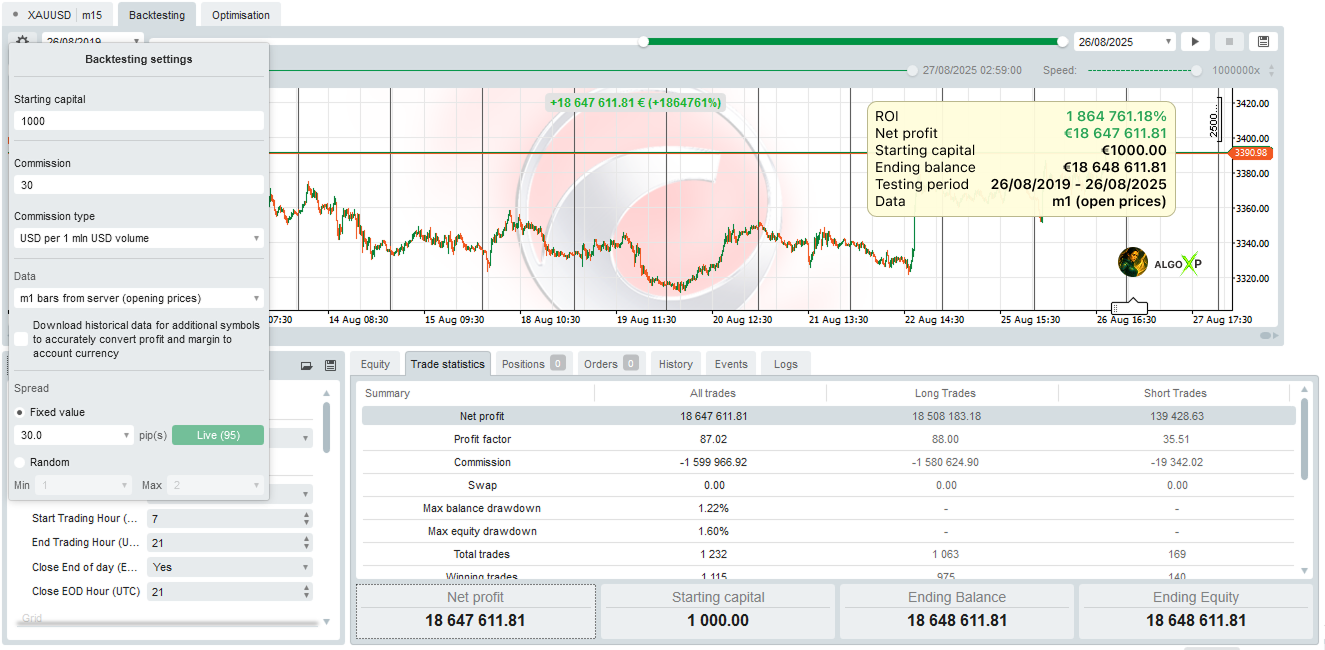
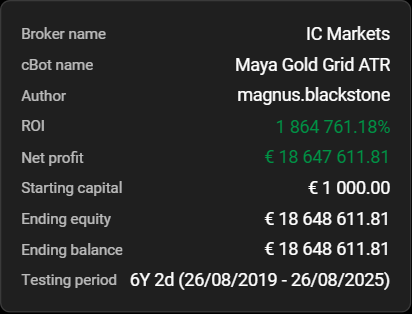
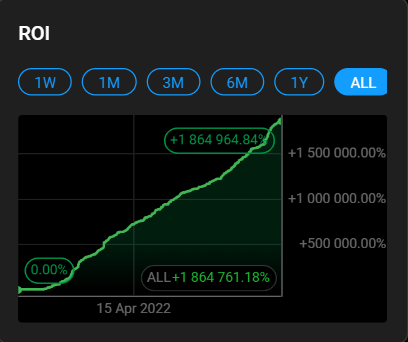
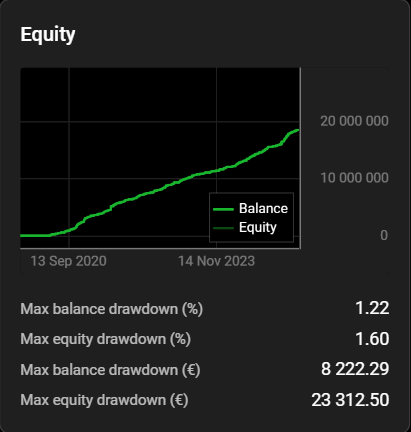
Backtesting on m1 bars for 6 years 26/08/2019 -26/08/2025
Using the High Risk preset, the bot showed consistent results across a long historical period. These figures should be considered approximate and indicative only, as bar-based tests do not reflect the accuracy of tick-by-tick execution, slippage, or spread variations. This backtest is presented to demonstrate the overall behavior of the strategy over longer periods.
Trade statistics